When you leave a place
“Leaving Home? Did you check the doors and the oven?” — the phone itself watches the boundary, so there’s no constant GPS tracking.
Did you lock the main doors today? What about the oven? Forgettable reminds you at the moment it matters — when you leave home, drop off your Wi-Fi, or at the time you choose — and remembers that you checked.
Coming soon to the App Store and Google Play.
On Android? Try it before everyone else.
Join the tester group, then install Forgettable from Google Play. Please keep it for 14 days — that’s what Google needs before launch.
Forgettable on iPhone Duo, unfolding from the regular phone screen. Open, the checklist fills the left half and the selected item, Lock house doors, fills the right half with Anna’s photo proof from 08:12. A notification on top reads: Leaving Home, 0 of 2. Did you lock the doors and turn off the oven?


Podcast · 24 min
A conversation about the “did I lock the door?” feeling and how Forgettable solves it. AI-generated with NotebookLM. Also on Spotify.
Reminds you at the right moment
Every item knows when it matters. Pick one trigger or combine them.
“Leaving Home? Did you check the doors and the oven?” — the phone itself watches the boundary, so there’s no constant GPS tracking.
Leaving your home Wi-Fi is a reliable sign you’ve left — and it works indoors where GPS doesn’t. Or get reminded when you join it.
iPhone: one-time Shortcuts setupOnce or every day. “Charge the car before you go to sleep” at 22:00, picked with your phone’s own time picker.
For the things you really can’t miss. On iPhone it rings like the Clock app — even in silent mode — with a button that opens the checklist.
iOS 26+ · loud alert on Android
Remind me…
Your list, your way
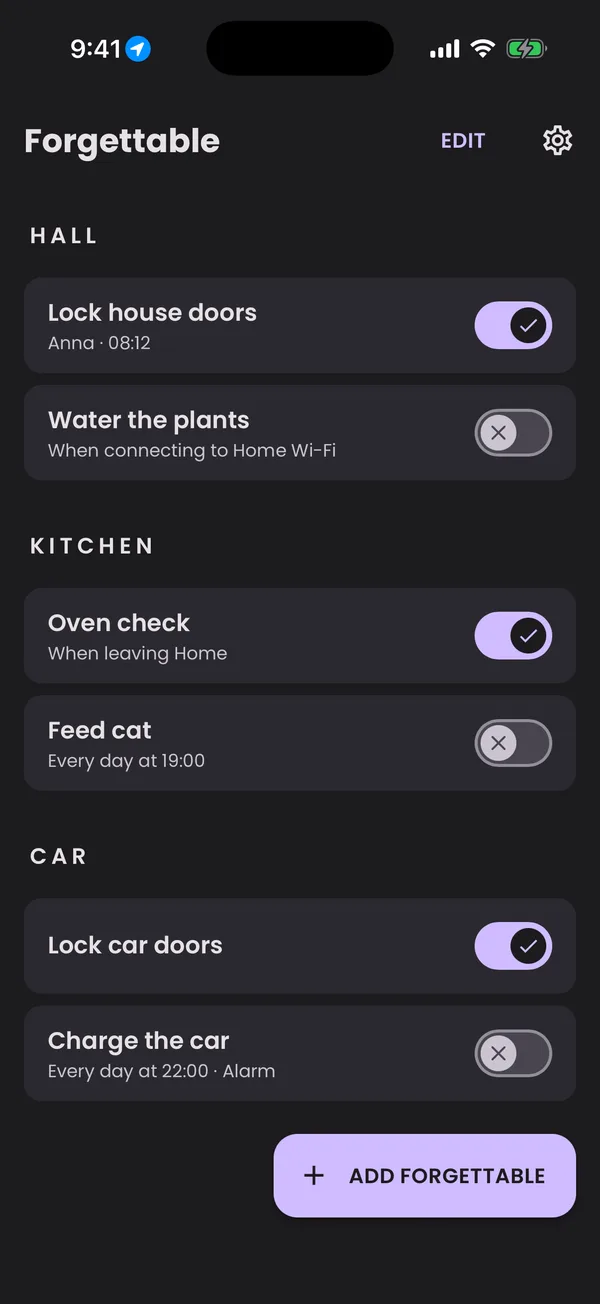
A long list stays tidy, and adding a new item takes a few taps — or a guided walk-through if you prefer.
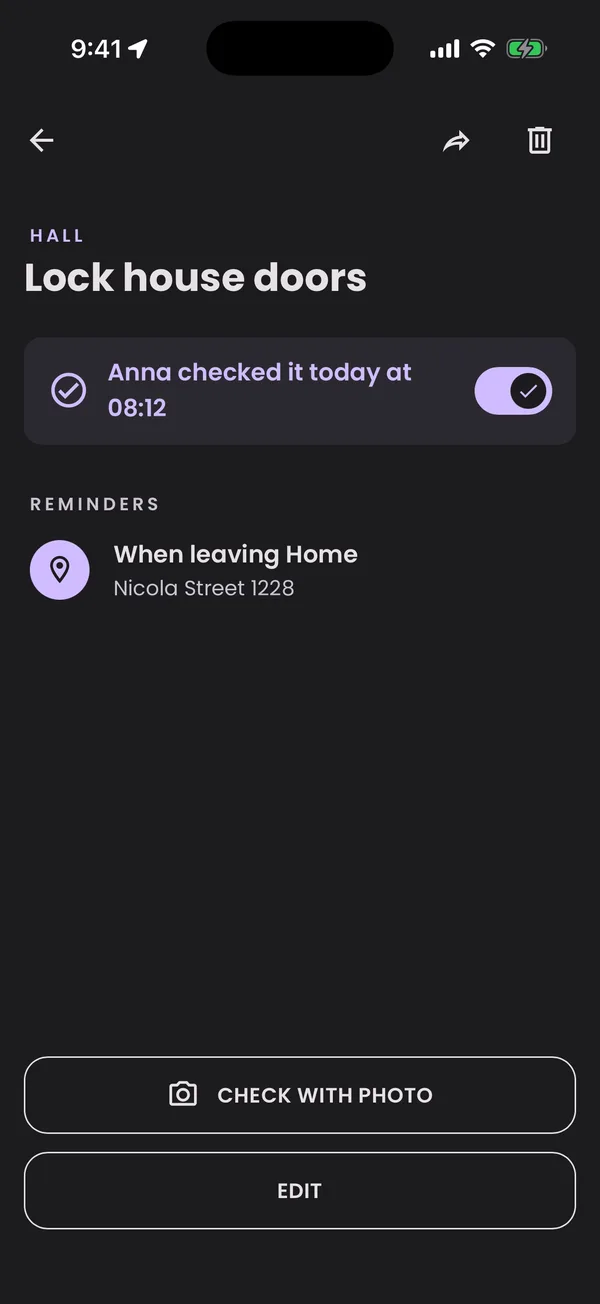
Did I really?
Every check is timestamped. Add a photo of the locked door or the oven dial, and the doubt is gone.
Widgets
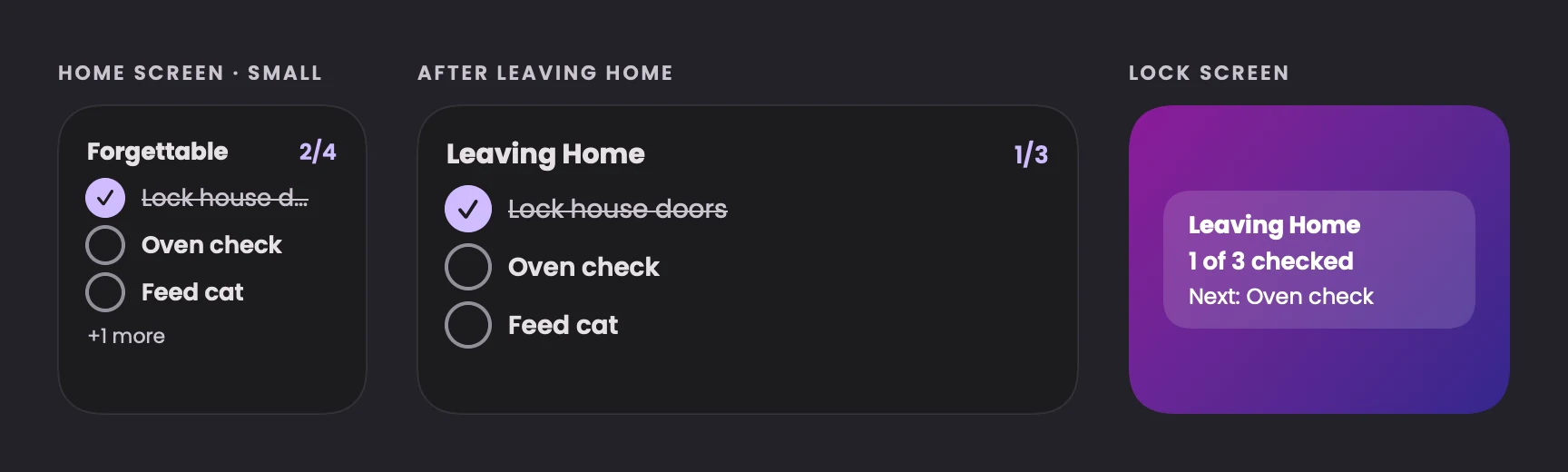
Interactive widgets on iPhone and Android, plus a Lock Screen counter. Right after you leave, they show just what to check: “Leaving Home · 1 of 3”.
Household
Share your checklist with your partner or roommates and see who checked what — “Anna locked the door at 08:12”. No more “I thought you did it.”
How it works
“Lock house doors”, “Oven check”, “Feed cat” — and put it in a section like Hall or Kitchen if you like. Or open a list someone shared with you.
When you leave or arrive somewhere, when your Wi-Fi changes, at a time — or as an alarm. All on one screen, or step by step.
The reminder opens straight to the item. Flip the switch, snap a photo if you like — and it’s on record.
Privacy
Your items, times and places live on your device. Without a household, nothing is sent to our servers.
The phone only wakes Forgettable at the places you saved. We never see where you go.
Household lists are stored in the EU and visible only to the people you invite.
FAQ
No. Place reminders use the geofencing built into iOS and Android: the phone watches the boundary in low power and only wakes Forgettable when you cross it. There’s no continuous GPS tracking.
Yes. Time reminders, alarms and place reminders all fire with the app closed. On iPhone, Wi-Fi reminders need a one-time automation in the Shortcuts app — see the step-by-step guide.
No. Forgettable works without signing up. If you create or join a household, your phone gets an anonymous account automatically — no email or password.
iPhone and Android. Interactive widgets need iOS 17 or later; real alarms on iPhone need iOS 26. On Android, alarms are high-priority alerts.
Yes. Share any items as a link — if your friend has Forgettable, they open right in the app; if not, they’ll be invited to install it first.

Get Forgettable for iPhone and Android.
Coming soon to the App Store and Google Play.